Have you ever dealt with a big PDF and realized you needed a few pages? Maybe it was an eBook, a study guide, or even an invoice. Printing the whole thing or saving the full file can feel like a hassle and a waste. What if you could pull out the pages you want without using fancy tools or signing up for anything?
This is what PDFGPT helps you do. PDFGPT makes picking out pages from any PDF file simple so you keep what matters and ignore the rest. It’s fast, free, and works straight from your browser. No downloads, no watermarks, and no headaches.
Why Choose to Extract PDF Pages?
You might not always need a full document. Pulling out specific pages from a PDF can help:
Find What You Need Faster: Instead of skimming through a giant file, grab the key sections you care about and dive straight into what matters.
Share the Important Bits: Whether working with coworkers, clients, or classmates, you might need to provide a few pages. Extracting them makes the content clear and to the point.
Cut Down on Storage Use: Big PDFs can eat up lots of space. Keeping just the parts you need saves room and keeps things tidy.
Make Docs That Fit Your Needs: You can pull pages from different PDFs and mix them into one file that matches your specific project or presentation.
Steps to Extract PDF Pages Online with PDFGPT
PDFGPT keeps the process of pulling out pages from a PDF easy. It doesn’t ask you to download software or sign up. Here’s what you need to do:
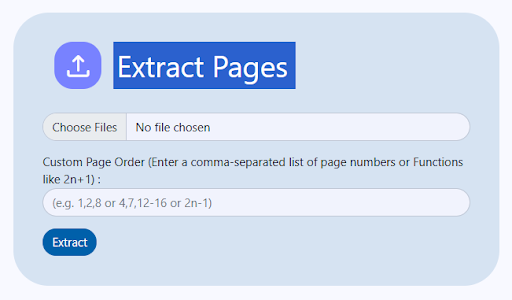
Extract PDF Pages With PDFGPT Now
Step 1: Go to the PDFGPT Page Extraction Tool
Visit the PDFGPT website and look for its page extraction tool. The layout is simple to use and helps finish the task without hassle.
Step 2: Add Your PDF
Pick the PDF file from your computer that has the pages you want to pull out. All usual PDF formats are supported, no matter how big the file is.
Step 3: Choose the Pages You Need
Type in the page numbers or ranges you want to pull out. It could be just one page, a few sections, or even pages that are not in order. PDFGPT can handle whatever you need.
Step 4: Extract these pages
Hit the “Extract Pages” button. PDFGPT processes your request while keeping the original layout, images, and formatting as they were.
Step 5: Get your new PDF
The extracted pages are ready for instant download. There’s no need to sign up, no delays, and no watermarks. You get the pages you asked for, ready to go.
Why pick PDFGPT to pull PDF pages?
PDFGPT is also an AI PDF summarizer that doesn’t just work fast; it’s trustworthy, safe, and designed with users in mind. Here’s why it shines:
- No Installation Needed: You won’t have to mess up your device with extra downloads. Everything runs in your browser, so the whole process stays simple and worry-free.
- Free and Unlimited: PDFGPT lets you pull out pages without spending anything. There are no hidden costs or limits, so you can use it as often as you like without stressing about charges.
- Compatible with Any Device: Whether you’re on a phone, a computer, or a tablet, PDFGPT adjusts to fit your screen. This lets you work from any place at any time.
- Keeps Your Privacy Safe: You don’t need an account, and they won’t ask for your email. Files are handled and deleted after use, ensuring your data stays private.
- Fast and Easy-to-Use: PDFGPT works through PDF files within seconds. It helps you save both energy and time. Use it when you need fast results without waiting around.
- All-in-One PDF Helper: More than just pulling out pages, PDFGPT lets you combine, break apart, shrink, or even sum up your PDFs. It offers one place to handle everything your PDFs might need.
Different PDFs You Can Use to Extract Pages
PDFGPT lets you work with all kinds of PDF files.
- Reports and Research Papers: Use key sections or findings to reference important details. This works well for students, researchers, or professionals who need specific parts of a document.
- Invoices and Receipts: Save financial records by keeping the essential pages. This suits accountants or business owners juggling numerous transactions.
- eBooks and Study Materials: Store specific chapters or notes to use offline. This helps students and anyone studying focus on important topics without carrying full books.
- Presentations and Portfolios: Share slides or visual layouts needed for specific purposes. This works for designers, educators, and creative professionals who need to share just parts of their work.
- Legal Documents: Retain pages needed from contracts or agreements. This allows lawyers, clients, or paralegals to pay attention to the most relevant clauses.
- Event Tickets and Booking Confirmations: store evidence of your bookings or tickets. This helps travelers bring along just what they need instead of bulky PDFs.
- Manuals and Guides: Pull out parts like how-to-install instructions or help with fixing problems. This comes in handy for people like technicians, students, or those doing projects themselves.
- Certificates and Diplomas: Save duplicates of key qualifications or achievements. This works well for schools, HR teams, or keeping personal records safe.
Final Thoughts
The digital world moves fast, and we need entire PDFs. Picking out certain pages allows you to save, share, or use information better. PDFGPT makes it simple to do this. It is quick, free, and works on any device. Upload your file, choose the pages, and get your updated PDF. There is no need for extra software or dealing with watermarks. You get the pages you need ready when you want them.