Have you ever found a web page, whether it’s a great blog post, a stunning portfolio, a receipt from an online purchase, or a helpful article, and realized that bookmarking doesn’t do the trick? Maybe you wanted to save it but printing right from the browser ended up messy, with the layout wrecked, pictures out of place, or parts of the text missing. This is why turning a web page into a PDF can be so useful.
Similar to how you save Word or Excel files as PDFs to lock in their design and maintain a uniform look, turning a webpage into a PDF captures that snapshot of the site as a printable, shareable, and portable file. It avoids layout issues, keeps every section intact, and works no matter the device.
This blog explains why converting a Web page to PDF is important and how PDFGPT simplifies it. You get fast and precise results without needing to download anything or create an account.
In our tech-filled daily lives, we often need ways to keep web content handy to reference, document, access offline, or use as proof. Turning web pages into PDFs isn’t just helpful. At times, it’s essential.
Why Convert Web Page to PDF?
Modern websites often use unique fonts, CSS styles, and creative layouts. Simple copy-pasting or direct printing messes up the format. PDFs though, hold onto the exact look of the web page as it appears on your screen.
Access It Without Internet
Maybe you’re on a trip dealing with spotty internet, or flying somewhere. If you save the content in PDF form, you can read it anytime without needing to be online.
Store Information for Later Use
Web pages might change, disappear, or get edited. Saving them as PDFs helps you keep a copy of the version you accessed and found useful. This works well when you need to save receipts, legal documents, news reports, or references.
Simple Sharing on Any Device
If you need to send a web page by email, include it in a report, or print it to discuss in a meeting, PDFs make sure others view it just like you did. It works no matter what browser, settings, or device they use.
How to Convert Web Page to PDF Online Using PDFGPT
You no longer need to rely on bulky browser add-ons or waste time taking screenshots of web pages. PDFGPT is also known as an AI PDF summarizer that lets you turn any public website into a PDF. It’s simple, clear, and gets the job done in seconds without any trouble.
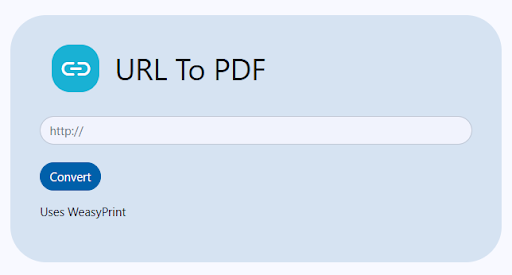
Convert Web Page to PDF Now
Follow These 5 Steps:
Step 1: Open the PDFGPT Web Page to PDF Converter
Head to PDFGPT’s tool for changing web pages into PDF. The layout is user-friendly, sleek, and focused on completing the task.
Step 2: Enter the URL
Copy the web page link you want to turn into a PDF. Whether it’s a blog, an article, a portfolio, or even a receipt from an online shop, paste the link into the box provided.
Step 3: Adjust Settings If You Want
Do you want to change the paper size, set up margins, or flip to landscape view? PDFGPT lets you tweak basic settings to make the PDF suit your needs.
Step 4: Press “Convert to PDF”
Tap the convert button, and PDFGPT will turn the webpage into a PDF file. The layout, images, and interactive elements will stay the same without loss.
Step 5: Download Right Away
Skip the hassle of signing up or confirming your email. Download your file right then. Save it to your device or upload it to your cloud storage, whichever you prefer.
Why Use PDFGPT to Convert Web Pages to PDF?
PDFGPT takes converting web content a step further. It prioritizes ease of use, privacy, and efficiency. Here’s why it shines:
1. No Need to Install Anything
You won’t have to clutter your browser by adding another plugin. It operates entirely in your browser and keeps things quick and seamless.
2. Free to Use Without Watermarks
PDFGPT doesn’t make you pay for conversions or leave watermarks on your files. Your PDFs look polished, whether you’re using them for work or personal projects.
3. Compatible with Any Device
It works well on phones, tablets, PCs, and Macs. PDFGPT adjusts to every screen size and delivers a smooth experience everywhere.
4. Protects Your Data
You don’t need to sign up, share your email, or worry about your files being stored. PDFGPT clears all uploaded data after a brief period to make sure your information stays private.
5. Fast Results, No Delays
Forget waiting around for your file. Conversions happen often within seconds giving you immediate results.
6. Your One-Stop PDF Tool
PDFGPT does more than just convert files. You can compress PDFs, summarize content split pages, and more all from your web browser.
Types of Web Content You Can Convert to PDF
Ever asked what types of pages this tool works with? The short answer is any page that is accessible.
Articles & Blogs: Save useful reading material to read later or keep as a reference.
Receipts & Confirmations: Store your purchase details and submission records in a safe place.
eCommerce Product Pages: Keep a copy of product details, reviews, and photos.
Portfolios & Resumes: Save layouts and designs to show to clients or review before printing.
Legal Notices & Terms of Use: Keep dated versions to look back on later if needed.
Tutorials & Guides: Store step-by-step instructions and how-to articles so you can check them offline.
Tickets & Booking Pages: Have backup copies of event details or travel bookings.
Final Thoughts
These days, most information exists online, but it’s not always there to stay. Web pages get updated, taken down, or altered. Saving a web page as a PDF helps lock in that exact version so you can always access, share, or print it. PDFGPT makes this super easy. There are no downloads, restrictions, or fuss. Just grab the link, convert it, and take your content with you anytime.