Have you ever been stuck trying to handle several PDFs just to finish one task? Maybe you need to pull together a set of contracts, stack up some invoices, or piece together class notes. Jumping between separate files wastes time and makes it easy to lose track of things or get confused. Instead, you need one that handles several PDFs, a combined PDF that keeps everything in order. That’s where the ability to Merge PDF Files Online for Free becomes essential.
In today’s fast-paced world, managing documents isn’t just about storing them but also about making tasks smoother, encouraging teamwork, and accessing files. With tools like PDFGPT, combining PDF files online has become simple. You don’t need to download anything, sign up, or deal with unnecessary steps.
This guide will explain how you can combine PDF files online, show how PDFGPT makes the process easy, and share why this tool is a great choice to boost how you get things done. Let’s take control of your document chaos!
Why Combine PDF Files?
To understand how to merge PDF files, you first need to think about why you might want to do it. Whether you’re working in school, business, law, or design, plenty of situations call for combining files.
- Contracts: Gather signature pages terms, and updates all in one place.
- Invoices: Merge PDFs to make a single record for monthly or quarterly bills.
- E-books or Guides: Turn separate chapters into one complete document.
- HR Onboarding: Share one file with all necessary employment paperwork.
- Client Presentations: Put visuals, charts, and case studies together in one file.
Need to send multiple files to a client or coworker? Sending several separate files feels messy and not very polished. Combining them into one single document is a better choice and makes things quicker for everyone.
How to Combine PDF Files Online for Free
Years ago, combining PDFs meant paying for programs like Adobe Acrobat or using complicated desktop software. That’s no longer the case today. With tools like PDFGPT, it’s basically drag, drop, and done.
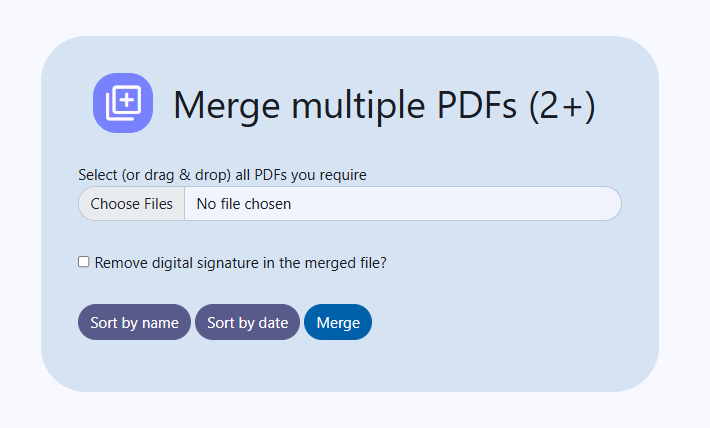
Step 1: Open PDFGPT’s Free Online PDF Merger
Head to the PDFGPT Merge Tool page (or pick a different reliable online PDF merging tool). You should see a simple screen where you can upload your files.
Step 2: Add Your PDF Files
Upload your PDF files all at once or just drop them into the upload area. You don’t have to add them one-by-one because PDFGPT lets you handle multiple files together.
Step 3: Organize Files in Order
When the upload finishes, a list of your files will appear showing how they’ll be merged. If you need to adjust the order drag them around to set it the way you want.
Step 4: Merge the Files
When the files are sorted properly, press the “Merge” or “Combine” button. PDFGPT will put everything into one single PDF document for you.
Step 5: Download Your Combined File
Once the tool finishes processing, you’ll see your combined PDF ready to download. Save the file to your device or send it to a cloud service like Google Drive or Dropbox. You won’t need to sign up or wait around.
Why Choose PDFGPT to Combine PDFs?
Plenty of online tools allow combining PDFs, but PDFGPT stands out with a great mix of simplicity, intelligence, and speed. PDFGPT is also AI PDF summarizer, where you summarize PDF for free, becoming the go-to option for students, professionals, and everyday users:
1. Always Free with No Surprises
PDFGPT provides free tools to work with PDFs without restrictions. Combine as many PDFs as you want without watermarks or limits on the number of pages. There are no hidden tricks to make you buy anything later.
2. Fast Online Operations
PDFGPT runs on the cloud offering quick processing. You don’t need to download bulky programs or add extensions to your browser. Just open it online and get started.
3. Easy-to-Use Design
PDFGPT uses a simple and clear layout so anyone can edit PDFs without trouble. Upload, organize, and hit merge. It’s that straightforward.
4. Efficient File Management
PDFGPT handles big documents multiple pages, and even files with different sizes or orientations. This makes it ideal for business professionals who work with difficult files.
5. Privacy and File Safety
The platform ensures your files stay secure by processing them and deleting them from its servers after. Your data stays confidential and protected.
6. No Accounts Needed
You do not have to sign up or provide your email. PDFGPT allows you to stay anonymous and still gives you access to strong PDF tools.
7. Compatible Everywhere
You can use PDFGPT on desktops, tablets, or smartphones. It works on Windows, macOS, Android, or iOS.
8. Complete PDF Toolbox
Merging is one of its features. PDFGPT lets users split, shrink file sizes convert formats, sum up content, add notes, and much more. It provides all these PDF tools without any cost.
Why Merge PDF Files?
Not convinced if merging is useful? Below are some usual scenarios where combining PDFs helps.
- To send client proposals: Put your cover letter, portfolio, references, and service agreement together as a polished file.
- To organize coursework: Combine your assignments, lectures, and reading materials into one PDF for each subject or semester.
- To manage real estate contracts: Bundle your disclosures, payment terms, and purchase agreements into one document for easier review.
- To work with your team: Bring together wireframes, design feedback, and specs in one place to keep everyone on the same page.
- To handle legal filings: Collect your exhibits and supporting documents into one file to submit more .
Summary: Easy Ways To Merge
In today’s busy world where saving time matters most, handling PDFs should be easy and fast. PDFGPT lets you combine PDF files and from any device. You won’t need advanced tech know-how or expensive tools, just upload your files, merge them, and download.
It doesn’t matter if you’re a freelancer working on a project, a student organizing your notes, or a professional sharing files. PDFGPT helps you merge PDFs with free.