Dealing with oversized PDF files can be frustrating, especially when you’re trying to upload them to emails, websites, or cloud storage, but compressing a PDF without affecting its quality? That’s a challenge.
With PDFGPT, you can compress PDF files quickly, securely, and with zero loss of layout or clarity. PDFGPT ensures your document stays sharp and structured, just lighter, whether on your desktop or mobile. Let’s see how you can compress PDF files using PDFGPT online, offline, or on any device.
Compress PDF Files Online for Free
Most PDF compressors reduce file size by sacrificing quality. PDFGPT, however, uses intelligent compression to minimize size while keeping everything intact.
Why use PDFGPT?
- 100% web-based tool
- No installation or sign-up needed
- Works on Windows, Mac, Android, iPhone, and Linux
- Maintains original layout, images, and fonts
How to Compress PDF Using PDFGP
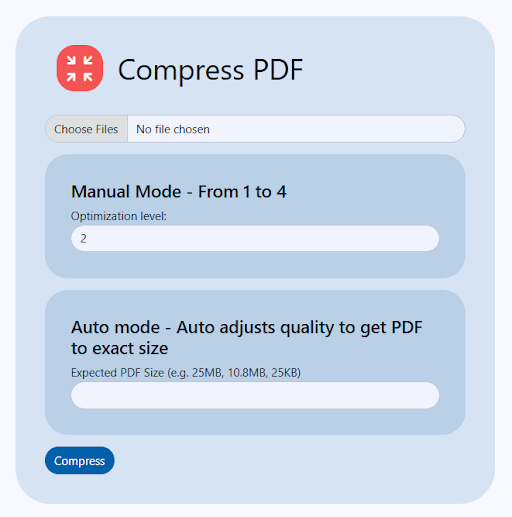
Compress PDF file Online for Free
Step 1: Go to the PDF Compression Tool on PDFGPT
Step 2: Click “Upload PDF” or drag and drop your file
Step 3: PDFGPT compresses your file instantly
Step 4: Download your optimized PDF, smaller, but still crystal clear
Benefits of Using PDFGPT for PDF Compression
1. No Sign-Up Needed
Compress your PDF files instantly without creating an account or providing personal information. PDFGPT ensures a quick and seamless experience with no interruptions or login steps, perfect for when you’re in a hurry or working on the go.
2. Maintains Document Quality
Unlike many online tools that reduce size at the expense of content quality, PDFGPT preserves every detail, sharp text, clear images, intact tables, and proper page structure. You get a smaller file without sacrificing readability or design integrity.
3. AI-Powered Compression
PDFGPT leverages intelligent algorithms to analyze and compress your files efficiently. It reduces file size by removing redundancies, optimizing embedded elements, and streamlining metadata, all while ensuring the final output remains visually and structurally consistent.
4. Secure & Encrypted Processing
Your data privacy is a top priority. PDFGPT uses strong end-to-end encryption during upload and download. Once the compression is done, your files are automatically deleted from the servers to eliminate any risk of unauthorized access or data leaks.
5. Works on All Devices
Whether you’re using a Windows PC, MacBook, Android phone, iPad, or Linux system, PDFGPT works flawlessly. It’s optimized for all major browsers and devices, so you can compress your PDFs anytime, anywhere, with no software conflicts or limitations.
6. Easy for Everyone
PDFGPT is designed with simplicity in mind. Whether a student, professional, or non-tech-savvy user, you can upload and compress PDFs in just a few clicks. There are no complicated settings, just fast, intuitive usability that saves time and effort.
7. No App Required
There’s no need to install bulky apps or browser extensions. With PDFGPT, everything happens in your browser. That means no storage usage, no updates to manage, and the freedom to compress files on shared or temporary devices securely.
Final Thoughts
Large PDF files don’t have to slow you down. Whether you need to email a report, upload to a portal, or just save space, PDFGPT helps you compress your PDF without losing quality or formatting. Try PDFGPT’s free PDF compressor and AI PDF summarizer, leverage now to get the best deals for smooth, fast, and reliable file optimization on any device.